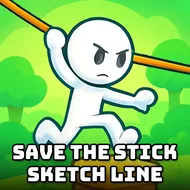
Save The Stick Sketch Line
Instructions:
Mouse click or tap to playDescription
Play Save The Stick Sketch Line 100% Free
No installs, no waiting around for a download bar to crawl across your screen. You just open the tab and you're in, which honestly matters more than people admit when all you want is five minutes of brain-teasing fun on a lunch break. It runs straight in the browser, so there's nothing clogging up your storage and nothing to uninstall later if it turns out you'd rather move on to something else. That kind of zero-friction access is exactly why quick puzzle games like this one tend to stick around in someone's bookmarks longer than the fancier titles do.
How To Play
The whole thing runs on a mouse click or a tap, nothing more complicated than that, but the puzzles themselves ask you to actually think before you commit. You're handed a stickman in some kind of trouble, and it's on you to sketch the line that gets him out of it, whether that means bridging a gap, redirecting a falling object, or setting up a path he can safely walk. There are two modes to pick between, Save Stickman and Love Story, and each one leans on the same drawing logic but frames it differently, one focused on rescue scenarios and the other wrapped around a lighter, more romantic little narrative. Physics plays a part too, so a line drawn at a bad angle might not hold the way you expected, and that's usually the moment you realize the puzzle wanted a different kind of solution altogether.
Top Tips
- Look at the whole scene before drawing anything, not just the stickman's immediate spot.
- Keep your lines simple; overcomplicated sketches tend to collapse under their own weight.
- Watch how gravity treats your line once it's drawn, then adjust your next attempt accordingly.
- Try Love Story mode when you want a gentler pace between the trickier rescue puzzles.
- Redraw without hesitation if a line fails; there's no penalty for a few extra tries.
- Slow down on later stages since the margin for error gets noticeably tighter.